
PESCO Online Bill 2026 – Check & Download Duplicate Bill
Check PESCO Online Bill
Enter your reference number or consumer ID to view your bill
DISCLAIMER: This tool only redirects you to the official PESCO/PITC bill portal and does not store any data.
PESCO Online Bill 2026 is a utility site that helps you check your latest PESCO / WAPDA electricity bill online via the official PITC / PESCO portal. Simply enter your 14-digit Reference Number or 10-digit Consumer ID in the provided tool and press Continue; your bill will open on the official PITC / PESCO electricity bill page.
You can view the full bill, including the bill amount, due date, and meter readings. You can also download and print a duplicate bill (bill copy) for your personal records. This website does not store your personal data.
Note: This website is an independent informational resource and is not affiliated with PESCO or PITC.
Why Use This PESCO Online Bill Tool?
The PESCO Online Bill tool allows you to quickly check your latest electricity bill, confirm the due date, and download a duplicate copy through the official PITC portal. It saves time and helps you avoid late payment surcharges by giving instant access to your billing details.
How to Check PESCO Online Bill in 3 Steps
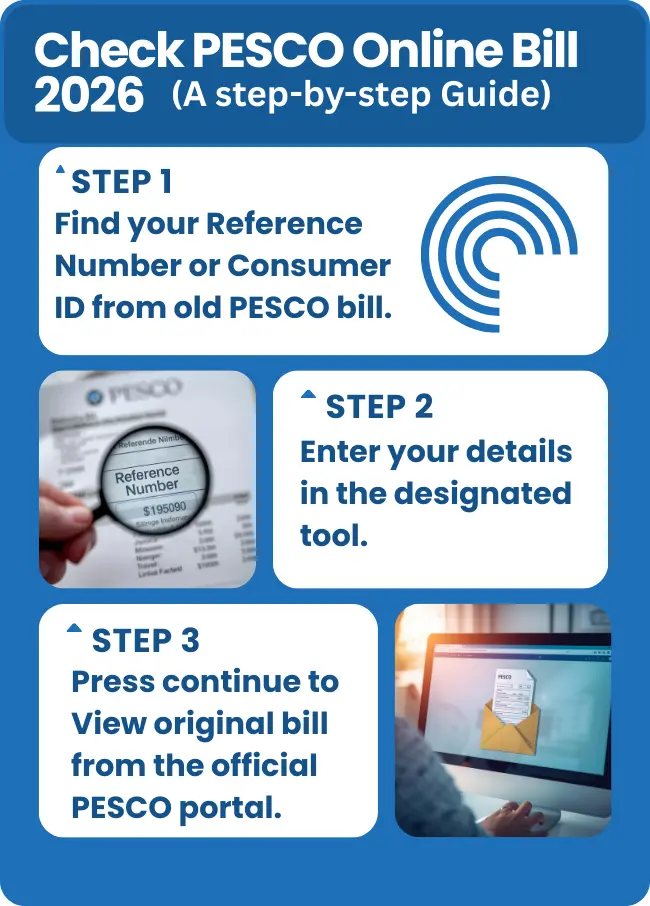
- Find your Reference Number or Consumer ID
14-digit Reference number and 10 digit Consumer ID are printed on your old PESCO electricity bill. Copy them carefully. - Enter it in the tool
You can paste any one of them on the Check PESCO Bill Tool and click Continue button. - View your bill on the official portal
After clicking Continue your bill will open on the official PESCO / PITC bill portal in a new tab through the Open My Bill button. The whole process in illustrated in the figure.
Where to Find Reference Number or Customer ID on Your PESCO Bill
You will find the reference number and consumer ID on your old PESCO bill copy where these are printed near the top left area. Both numbers can be used to check the current bill. For your guidance the numbers are highlighted with red boxes in the PESCO bill illustration below.
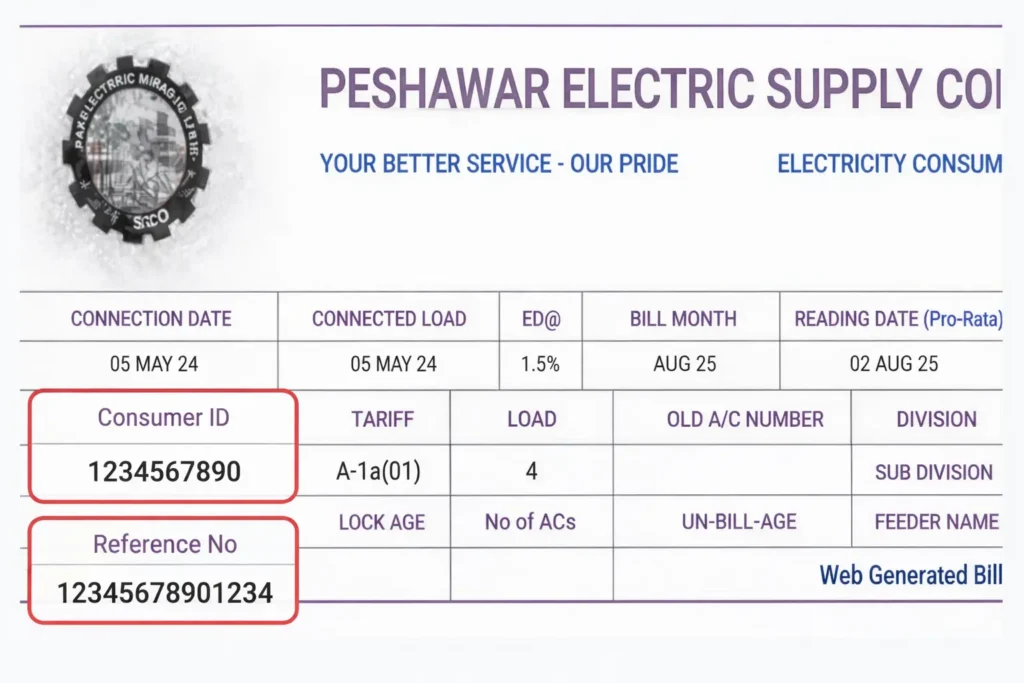
The above image of PESCO Online Bill is for education purposes only. You will see a letter U or R written next to the reference number in your original PESCO bill. This depends only on your area of residence, whether it is Urban (U) or Rural (R). This letter is not entered in the Bill Check Tool; it only requires entering the digits.
Reference Number (Recommended)
- Consists of 14 digits
- Represents the primary code for bill identification
- Usually printed in a clearly labeled box at the top section of the bill
- Recommended for PESCO Online Bill Checking
Consumer ID (Alternative)
- Consists of 10 digits
- Represents the consumer account ID
- Printed near the top section of the bill, often close to the Reference Number
- Can be used as an alternative for online bill check
Key Information on Your PESCO Bill
Besides the Reference Number and Consumer ID, the PESCO online bill contains important information related to electricity usage and billing. Understanding your electricity bill helps you control usage, reduce the bill amount, and identify issues such as incorrect meter readings. The following are the main areas you should pay attention to:
Bill Issue Date & Due Date
The date when bill is generated by PESCO billing department, the Issue Date is written on the bill with the Due Date, usually on right side of the top area. Payment within this Due Date helps avoid late payment charges and keeps the bill amount unchanged. The bill amount payable before and after the due date is clearly mentioned on the bill.
Meter Reading & Units
Meter readings (both previous and current) are recorded by PESCO and printed on the bill for billing accuracy and usage verification. Total units consumed for the current month is calculated by subtracting the previous meter reading from the current reading.
Export, Import & Net Units (For Solar / Net Metering Users)
For solar panels / net metering users, the bill shows Import units (units consumed buy the user from the grid) and Export units (the surplus electricity units generated by the solar panels which goes back to the grid). The final bill is the difference between the two (Import – Export). When export exceeds import the bill shows a credit or minus value. Net metering calculations follow the NEPRA net metering policy applicable in Pakistan.
Peak Hours
The unit consumed during Peak Hours is more expensive than other times of the day. The consumed units during peak hours are written separately on bills of net metering solar consumers. This helps the consumer to reduce electricity usage during these hours to reduce their bills. Peak hour timings are notified by PESCO and may vary seasonally as per NEPRA guidelines. Following is the current peak hours table.
|
Season |
Peak Hours |
|
November – March (Winter) |
6:00 PM – 10:00 PM |
|
April – October (Summer) |
6:30 PM – 10:30 PM |
Late Payment Surcharge
Late payment may result in a late payment surcharge as notified by PESCO under NEPRA-approved tariffs. You have to pay an additional amount as Surcharge or fine. The surcharge amount is printed separately on the bill and regulated under NEPRA tariff rules. There is also Payable After Due Date bill amount printed on the bill, which informs the consumer about the surcharge before time.
Paid / Unpaid Status
The paid bills are written on your PESCO online bills. The unpaid bills are carried forward with surcharge amount to the next bill. Payment status is updated by PESCO / PITC systems and may take some time after payment to show online, usually 24 to 72 hours. If the status does not update after this period, consumers can contact the PESCO Helpline for assistance.
PESCO Tariff (Unit Rates & Slabs)
Electricity tariffs are regulated by NEPRA and implemented by PESCO under Government of Pakistan policies, in Khyber Pakhtunkhwa. The rate is directly related to usage and increases with increasing usage.
You can estimate your next bill by using our PESCO Bill Calculator.
How PESCO Tariff Works
- Lower the usage, lower the Tariff slab and smaller the bill amount.
- Higher the usage, higher the Tariff slab and larger will be the bill amount.
- Tariff slabs are defined for domestic, commercial, and industrial consumers as per NEPRA tariff determinations.
- Tariff is higher for commercial users as compared to domestic.
Quarterly Tariff Adjustment (QTR / DMC)
Tariff adjustment shows the changes in cost of electricity generation and usually appear every third month on your PESCO Bill.
It applies on domestic users only when their consumption increases above 300 units. On commercial users it is always applied regardless of the units used. Quarterly adjustments are notified by NEPRA and reflected on PESCO bills as DMC / QTR charges.
Tariff Rationalization Surcharge (TR)
Tariff Rationalization Surcharge appears as debit or credit on your bill. This surcharge is applied under NEPRA tariff rationalization rules to balance government subsidies. It is the difference between the Government-notified tariff and NEPRA rates.
Why Your Bill Changes
Despite of consumption of same number of units the bill amount may vary due to:
- Changes in Tariff slab
- Fuel Price Adjustment (FPA) and other government-notified surcharges
- Quarterly adjustments
- Surcharge changes
- Changes in peak hours usage
For more detailed description of unit rates and slabs visit PESCO Tariff page
Common Problems & Quick Fixes When Checking PESCO Online Bill
Most PESCO online bill issues are temporary and can be resolved easily by following the quick fixes below.
Website not loading
Check your internet connection, clear browser cache, or use another browser. The official bill portal is managed by PITC, and temporary downtime may occur during maintenance.
Current Bill not showing
Usually there is a billing cycle for every area. Wait for 24 to 48 hours after your bill update cycle. Contact PESCO Helpline in case further delay or visit local PESCO Office.
Reference number is not working
Check if you have entered the correct 14-digit Reference number, remove any spaces, dashes or alphabets. You can also use consumer ID as an alternative.
PDF not downloading
Please make sure you have installed a PDF reader on the device. Check permissions in your device settings. Also check your internet connection and clear your browser cache and try again.
About PESCO
PESCO (Peshawar Electric Supply Company) was originally part of WAPDA. That’s why some people still refer to electricity bills as WAPDA bills. However, in 1998, the Government of Pakistan restructured the electricity sector, resulting in Formation of PESCO, along with other companies.
PESCO is now an independent state-owned public utility under the Government of Pakistan. PESCO operates under the regulatory framework of NEPRA, which approves electricity tariffs and policies in Pakistan.
Before 2023 PESCO (Peshawar Electric Supply Company) operated through 9 circles, but on January 2026 Hazara 1 and Hazara 2 circles were shifted to HAZECO (Hazara Electric Supply). Since then, PESCO structure consists of 7 circles operating through Khyber Pakhtunkhwa. Each Circle supervises multiple Division and Subdivision Offices.
PESCO Circle Offices
Circle |
Coverage Area |
|
Peshawar Circle |
Peshawar region |
|
Mardan Circle |
Mardan district |
|
Swat Circle |
Swat district |
|
Swabi Circle |
Swabi district |
|
Khyber circle |
Khyber region |
|
Bannu Circle |
Bannu district |
|
D.I. Khan Circle |
Dera Ismail Khan district |
Frequently Asked Questions
How can I check my PESCO Online Bill ?
You can check PESCO online bill easily and quickly by logging in to our website checkpescobil.pk. You just have to enter your Refence number or Consumer ID in the bill check tool on top.
Is this website official or safe to use?
Yes you are absolutely safe in using our website because we do not store any data. Our check bill tool redirects you to your bill on the official PITC / PESCO portal.
What is the difference between Reference Number and Customer ID?
The Reference Number is a 14-digit code on your bill for quick searches and it is always the preferred choice. The Customer ID is your account number with the billing department and is 10 digits long, linked to your meter. Both can be used to check PESCO Online Bill.
Can I check multiple bills using the online tool?
Yes, you can check any PESCO bill online here. You don’t have to register to check your PESCO bill. You just have to enter the Reference number or Consumer ID of the bill you want to check in the PESCO Online Bill Checker tool.
Does this website charge any fees for bill checking?
No, our tool is free of cost. It only redirects you to the official PESCO site, which also permits free bill check.
What is the PESCO Helpline?
The PESCO Helpline is available to assist consumers with billing queries, payment status, and service-related concerns. Consumers may contact the official PESCO helpline provided by PESCO Head Office.
What if my PESCO bill is not showing online?
It usually takes a few days after meter reading that your bill is updated on the PESCO/PITC portal. If your current bill is not showing, you can wait and try again later. Check your Reference number or Consumer ID entry in the bill checker tool, if it is correct. Also check efficiency of your internet connection.
Who regulates PESCO electricity tariffs?
Electricity tariffs are regulated by NEPRA and implemented by PESCO under Government of Pakistan policies. NEPRA is the authority that regulates the electricity tariffs and it is implemented by PESCOunder the umbrella of the Government of Pakistan.
What do PESCO, PITC and WAPDA stand for?
PESCO stands for Peshawar Electric Supply Company, PITC stands for Pakistan Information Technology Limited, and WAPDA stands for Water and Power Development Authority.
With this PESCO Online Bill tool, you can quickly verify your latest bill, check due date, and download duplicate copies safely through the official PITC portal.